

Thermostat not reading correct temperature? Tape a thermometer to the wall beside it and compare the two. ENERGY STAR requires a smart thermostat that carries its label to read within 2 °F of the true temperature in a laboratory test, so a gap of a degree or two is normal. A bigger gap usually comes from where the thermostat hangs: sunlight, a supply register, a lamp, a cold outside wall, or air leaking from the wire hole behind it.
- ENERGY STAR requires a smart thermostat that carries its label to read within 2 °F of the true temperature in a laboratory test ENERGY STAR
- Honeywell Home’s Indoor Display Offsets can make the display read up to three degrees higher or lower than the sensor Honeywell Home
- ecobee’s Temperature Correction adjusts the sensor reading by up to ten degrees in either direction ecobee
- The normal January low at Richmond International Airport is about 29 °F NOAA
Key takeaways
- Check the thermostat against a thermometer taped beside it before changing anything.
- A gap that changes through the day is the location. A steady gap is the thermostat or a setting.
- Clear away sun, registers and lamps and seal the wire hole before you touch the offset.
- If the reading is right and the room still misses the setting, look at the filter, the ducts and the equipment.
How do you check whether a thermostat is reading wrong?
Check a thermostat against a separate thermometer. Tape the thermometer to the wall a few inches from the thermostat, at the same height, then step away and wait until its reading stops changing. Compare the two numbers.
Keep your hands and your breath away from both, because a thermometer you just carried across the house is still reading your hand. Thermostats and thermometers both settle slowly: ENERGY STAR’s accuracy test reads a thermostat only after one hour in a chamber held at 70 °F.
Then run the test twice, once on a sunny afternoon and once late in the evening. A gap that comes and goes with the time of day, or with the system running, points to the spot where the thermostat hangs. A gap that stays the same day and night points to the thermostat itself or to one of its settings.
How to check a thermostat with a thermometer
- Hang a thermometer beside the thermostat Tape it to the wall a few inches away, at the same height.
- Step away and wait Keep hands and breath off both. Wait until the thermometer stops changing.
- Compare the two readings A degree or two apart is normal. Note which one is higher.
- Repeat at another time of day A gap that changes points to the location. A steady gap points to the thermostat or a setting.
Run the test once on a sunny afternoon and once late in the evening.
Why is my thermostat not reading correct temperature?
The usual reason is location. A thermostat measures the air and the wall right where it hangs, and when that spot runs warmer or cooler than the rest of the room, the reading follows the spot. Dust, weak batteries, a tilted mercury switch, a setting or a failing sensor come after that.
ENERGY STAR’s guide to heating and cooling says to install a thermostat away from heating or cooling registers, appliances, lighting, doorways, fireplaces, skylights and windows, and away from direct sunlight or drafts. It adds that interior walls are best. Everything on that list changes the temperature at the thermostat and nowhere else in the room.
Which way the reading is off tells you where to look. A thermostat that reads high is being warmed by something: the sun, a lamp, a television, a warm duct or pipe inside the wall. In winter it shuts the heat off early and the house runs cold. In summer it keeps the air conditioner running. A thermostat that reads low is being cooled, usually by an outside wall or a draft, and it does the opposite.
What the reading is doing, and what to check
| What you notice | Most likely cause | What to do |
|---|---|---|
| Reads high on sunny afternoons | Direct sunlight on the thermostat | Shade the window or move the thermostat. |
| Reads high most of the time | A lamp, television or electronics below it, or a humidity setting | Move the heat source. Turn off the feels-like setting. |
| Reads low on cold nights | An outside wall, or a draft through the wire hole | Seal the hole with putty. Move the thermostat to an interior wall. |
| System shuts off within minutes | A supply register blowing toward the thermostat | Turn the louvers away or fit a deflector. |
| Off by the same amount day and night | Dust, weak batteries, a tilted mercury model, or the sensor | Clean it, change the batteries, level it, then set the offset. |
| Room sensors in use | The screen shows an average of several rooms | Check which sensors are included and where they sit. |
| Matches the thermometer, room misses the setting | The equipment, the airflow or the ducts | Check the filter, then call for service. |
Find what your thermostat is doing in the first column.
Which spots make a thermostat read high or low?
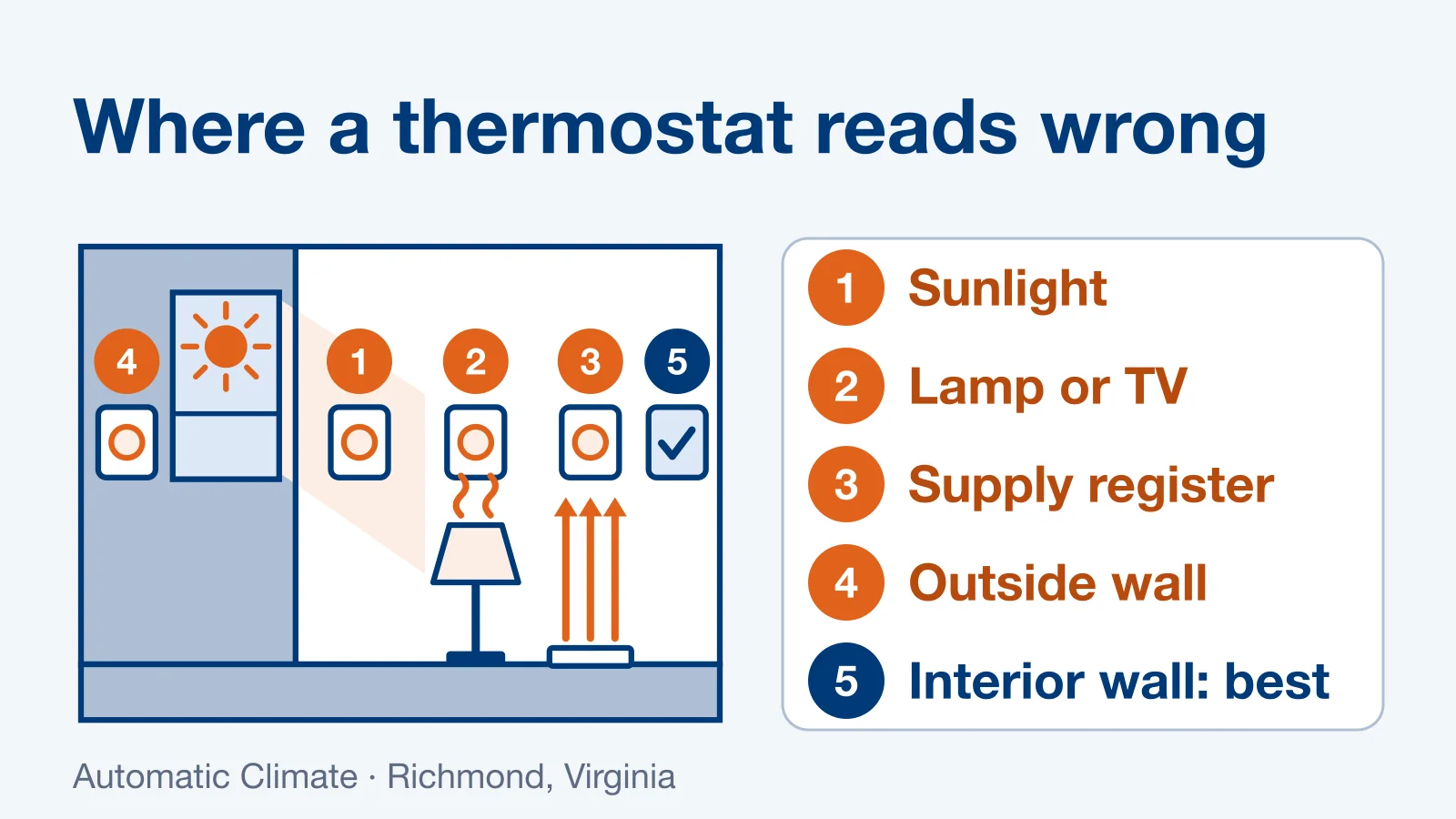
Five spots cause most wrong readings: direct sunlight, a supply register blowing toward the thermostat, a lamp or television below it, an outside wall, and a draft through the hole where the wires come out of the wall.
Sunlight. Google’s Nest help pages explain that direct sunlight heats a thermostat’s temperature sensors, so it reads the room as warmer than it is. The giveaway is a reading that climbs at the same hour on every clear day. Shade the window or move the thermostat.
A lamp or television. Warm air rises off anything that makes heat and runs straight up the wall to the thermostat. Move the lamp, the television or the shelf of electronics and test again.
A supply register. Air from a register is much warmer or cooler than the room. When it reaches the thermostat, the system shuts off early and the rest of the house never catches up. Turn the louvers away or fit a deflector.
An outside wall. Honeywell Home’s installation instructions for the T10 Pro rule out an outside wall behind the thermostat. The normal January low at Richmond International Airport is about 29 °F, according to NOAA’s climate normals, and on a night like that the inside face of an outside wall runs colder than the air in the room. The thermostat reads low and the furnace overheats the house. Move it to an interior wall.
The wire hole. ecobee’s support page on inaccurate readings names an open hole around the wiring as the most common installation fault, because the sensor picks up air from inside the wall. In an older Richmond-area house on a crawl space, that air can be cold in January and damp in July. Turn off power to the furnace or air handler, take a photo of the wiring, unscrew the wall plate, push the spare wire back and seal the hole in the wall with plumber’s putty, as ecobee advises.
What goes wrong inside the thermostat itself?
Four things inside a thermostat throw the reading off: dust on the sensing coil of an older model, weak batteries, a mercury thermostat that has been knocked out of level, and a temperature sensor that is failing.
Dust. An older mechanical thermostat senses temperature with a metal coil behind the cover, and a coat of dust slows its response. Take the cover off and clean inside with a soft, dry brush. Leave the glass bulb alone.
Batteries. Weak batteries can make a digital display dim or erratic before the low-battery warning appears. ENERGY STAR says to change the batteries each year if the thermostat runs on them.
Level. A thermostat with a glass bulb of mercury inside switches by the tilt of that bulb. Honeywell’s instructions for its Round thermostat say the wallplate must be level to maintain an accurate temperature. If the thermostat has been bumped, hold a small level against it and straighten it.
A failing sensor. Electronic sensors fail with age, and some smart thermostats report it themselves. Honeywell Home’s guide for the T9 lists an internal sensor error for which the only remedy is to replace the thermostat.
How do you adjust the temperature offset on a thermostat?
Most digital thermostats have a setting that shifts the displayed temperature up or down by a few degrees. Use the offset only after the location checks, and only when the gap is the same day and night, because an offset changes the number on the screen and nothing else.
Honeywell Home’s manual for its X8S and X8Q smart thermostats calls the setting Indoor Display Offsets and says it can make the display read up to three degrees higher or lower than the sensor. On an ecobee the setting is Temperature Correction, under Installation Settings and then Thresholds. ecobee allows up to ten degrees either way and says to use it only when the thermostat is off by a consistent amount. Many other brands keep a similar offset in the installer or advanced menu.
One Honeywell setting matters in a humid Richmond summer. The same manual says Feels Like Temperature can make the indoor reading show a few degrees warmer when relative humidity is high. If a Honeywell Home thermostat reads higher than the thermometer on muggy days, open Preferences, then Display, and turn Feels Like Temperature off before you touch the offset. ecobee has a similar humidity setting.
Can a remote sensor make the thermostat show the wrong temperature?
Yes. When a smart thermostat uses wireless room sensors, the number on its screen is often an average of several rooms, so it will not match a thermometer held beside the thermostat.
ecobee says the temperature on its screen is the average of every sensor taking part at that moment. Honeywell Home thermostats with wireless sensors can measure at the thermostat, at one sensor or as an average. Open the sensor list and see which rooms are included. A sensor on a sunny windowsill, above a register or in a closed-off spare room drags the average with it. Move that sensor to an inside wall of a room you use, change its batteries, or take it out of the average.
What if the reading is right but the room never reaches the setting?
A thermostat that agrees with the thermometer is doing its job, and the house is not keeping up. When the temperature sits short of the setting for hours, the cause is the equipment, the airflow or the ducts.
Start with the filter. ENERGY STAR says to check the filter every month and to change it at least every 3 months. A clogged filter cuts the air reaching every room.
Ducts come next. In a typical house, about 20 percent of the air moving through the duct system is lost to leaks, holes and poorly connected ducts, according to ENERGY STAR’s guide to heating and cooling, which says the result is difficulty keeping the house comfortable no matter how the thermostat is set. If some rooms run warmer or cooler than others, read why a system does not distribute air evenly.
If the thermostat calls for heat and the furnace never starts, see the reasons a furnace does not kick on. If a heat pump runs steadily and the air at the registers feels cool, see why a heat pump blows cool air. And if the heat keeps running when the thermostat is not calling for it, Honeywell Home’s manual says to turn off power to the heating equipment and call a professional.
A house that cannot hold its setting with a clean filter needs heating repair, not a new thermostat.
When should you replace the thermostat?
Replace the thermostat when its reading wanders while nothing around it changes, when it reports a sensor fault, when the display stays blank or erratic on fresh batteries, or when it is an old mercury model you planned to upgrade.
Test before you buy. A new thermostat on the same sunny wall reads wrong in the same way.
An old mercury thermostat needs care on the way out. The US Environmental Protection Agency says mercury thermostats are unlikely to break or leak while in use, and that old ones should go to a state or local household hazardous waste collection center for recycling. Keep it out of the trash and leave the glass bulb sealed.
A replacement is also the time to get a schedule working. Turning the thermostat down 7 to 10 °F for 8 hours a day can save as much as 10% a year on heating and cooling, the US Department of Energy says. The department also tells heat pump owners not to do this without a thermostat designed for heat pumps, because a manual setback can bring on the electric backup heat, which costs more to run. Heat pumps are common around Richmond, so check that a new thermostat is made for a heat pump with backup heat before you buy it.
Frequently asked questions
Why does my Honeywell thermostat read higher than the actual temperature?
Either heat is reaching the thermostat or a setting is adding to the number. Look for sun, a lamp or electronics below it, and a warm wall behind it. On Honeywell Home smart models, turn off Feels Like Temperature, which shows a warmer reading in humid weather. If a steady gap remains, correct it with Indoor Display Offsets in the Preferences menu.
Why is my thermostat screen blank?
Put in fresh batteries first if it uses them. On a wired thermostat, check that the breaker is on, that the power switch at the furnace or air handler is on, and that the furnace door is fully closed, because a switch behind that door cuts power to the thermostat. Reset a tripped breaker once. If it trips again, leave it off and call.
Why does the temperature drift a degree or two before the heat or air conditioning comes on?
That swing is designed in. A thermostat lets the room move a little past the setting before it starts the equipment, so the system is not switching on and off every few minutes. Google's Nest help pages call it the maintenance band. A small, even swing around the setting is normal operation and has nothing to do with a wrong reading.
Can I move a thermostat to a better wall myself?
The wiring is low voltage, but moving a thermostat means fishing new cable through the wall, patching the old opening and landing every wire on the right terminal, which matters most on a heat pump. Turn off power to the furnace or air handler before disconnecting anything. Where running cable is impractical, a wireless room sensor on a better wall does the same job.
How high should a thermostat be mounted?
Honeywell Home's installation instructions for its T10 Pro say about five feet above the floor, in a spot with good air circulation at average temperature. The same instructions rule out corners, the dead air behind doors, walls with concealed pipes or chimneys, and outside walls. Mount a replacement at the same height as the old one unless that was plainly wrong.
Does a smart thermostat read the temperature more accurately?
A smart thermostat sits on the same wall and is fooled by the same sun, drafts and lamps as the one it replaced. What it adds is ways around a bad spot: wireless sensors in the rooms you use, a display offset you can set yourself, and on some models a correction for direct sunlight.
What Automatic Climate checks when a thermostat reads wrong
We measure before we change anything. A calibrated digital thermometer goes beside the thermostat to get the size and direction of the gap. An infrared thermometer reads the wall around it, which shows a sun patch, a duct or a pipe behind the drywall. Then the thermostat comes off its plate: we look for an open wire hole, check that the plate is level and the connections are tight, and read the control voltage with a multimeter. If the reading proves right, we move to the equipment and measure the temperature rise across the furnace or the indoor coil, then the static pressure in the ducts with a manometer.
- Compare the thermostat with a calibrated thermometer and record the gap
- Read the wall surface with an infrared thermometer to find heat or cold reaching the thermostat
- Seal the wire hole, level the plate and tighten the connections
- Set the display offset, sensor averaging and humidity settings to suit the house
- Measure temperature rise, airflow and duct static pressure when the reading is right and the room is not
- Move the thermostat to an interior wall or replace it with one matched to the furnace or heat pump
Thermostat still reading wrong?
Tell us which way it is off, by how much, and whether the gap changes through the day. Those details usually tell us whether to bring a thermostat or to start with the equipment and the ducts.
Sources
- ENERGY STAR: Key product criteria
- ENERGY STAR: Program requirements for connected thermostats
- ENERGY STAR: Heating cooling guide
- ENERGY STAR: Heating cooling
- US Department of Energy: Energy saver guide
- NOAA: US climate normals
- US Environmental Protection Agency: Mercury consumer products
- Honeywell Home: Troubleshooting and support
- Honeywell
- Honeywell Home
- Honeywell Home: System installation
- Ecobee: My ecobee temperature is inaccurate
- Ecobee: How to use temperature correction on your ecobee thermostat
- Google (9249796)
- Google (9233450)
This guide was prepared for Automatic Climate with AI assistance.
CURRENT PROMOTIONS